Reverse Engineering a Brother Label Printer Driver
My Brother QL-700 switches itself off after 60 minutes idle, and it does not come back on a mains cycle — it boots to standby and waits for someone to press the button. Ten months of walking over to wake it up before printing a label.
The setting exists. Brother’s support pages tell you to change Auto Power-Off Time to 0 — either in the Windows app, under Printer Properties → Device Settings → Utility, or in the Mac P-touch Utility:
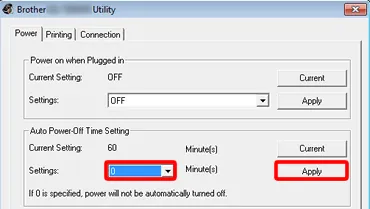
Brother’s own screenshot, from their support FAQ.
Two settings, a Windows app and a Mac app, and no third option. I run neither.
Keep that dialog in mind — both of those fields come back later, and so does the sentence at the bottom of it.
I do reverse engineering for a work project at the moment, so I pointed the same approach at this. Every step below runs on Linux. I never booted Windows.
First: is there just a command for it?
Brother publishes a Raster Command Reference for the QL series. If the setting is in there, this is a five-minute job and not a blog post.
curl -sfLO https://download.brother.com/welcome/docp000678/cv_qlseries_eng_raster_600.pdf
pdftotext -layout cv_qlseries_eng_raster_600.pdf ref.txt

grep -inE "power|auto.?off|sleep|shut" ref.txt
# 1298:  3000 ms sleep Printer
# 1599:  Power supply    Self-powered (As a printer class, Bus power is also set to
# 1611:  Power supply    Self-powered
A timing diagram and two lines from the hardware spec table. No command. The nearest thing to a persistent setting anywhere in the document is the serial baud rate, and only for the models with a serial port:
grep -in "Baud rate setting" ref.txt
# 927:  Name  Baud rate setting (QL-580N/650TD/1050/1060N)
The 32-byte status structure the printer returns has no power field either. So the command is not documented.
Prior art was no better. pklaus/brother_ql issue #50 asks for exactly this — a Linux way to disable auto power off — opened October 2018, still open, no protocol details in it. The QL-570 service manual confirms Brother has an internal tool (autopoff.exe, shipped as autopoff100.zip) but documents only which buttons to click in it.
Which leaves one place the command definitely exists: the Windows driver that sends it.
Get the driver
Brother’s download pages hide the file behind a EULA click-through, but the target is a plain URL. Printer driver 6.5.0c for the QL-700:
curl -sfLO https://download.brother.com/welcome/dlfp101262/qd700w650cus.exe
file qd700w650cus.exe
# PE32 executable (GUI) Intel 80386, for MS Windows
5 MB. Nothing needs to execute.
Open it
It is a self-extracting installer, and 7z walks straight through it:
7z x -o_x qd700w650cus.exe
ls _x/
# BrUsbPrnIO.dll  DevConnectSNMP.dll  Driver/  InstDevMgr/
# Setup.ini  setup.ps1  start.exe  THOOP.dll
The actual driver is an MSI one level down, which 7z also opens:
7z x -o_msi _x/Driver/Driver/bsq70.msi
ls _msi/
# BSQ70UI.DLL  BSQ70UT.DLL  BSQ70UT.EXE  BSQ70V.DLL  PTFILO.DLL  ...
31 files. BSQ70UT.EXE is the interesting one — “UT” for utility, which is the dialog that owns this setting. Its sibling BSQ70UT.DLL turns out to hold only resources, which you can see from the section table:
objdump -h BSQ70UT.DLL
# only .rsrc and .reloc -- no code
Resource-only, so the strings live there and the logic lives in the EXE. And the strings confirm we are in the right place:
strings -el BSQ70UT.DLL | grep -i "power"
# Auto power-off time setting
# If 0 is specified, power will not be automatically turned off.
# Power on when plugged in
-el because these are UTF-16 — plain strings finds nothing. Those are word for word the labels in the screenshot above, including the sentence under the input box. The dialog is this file, so the code that sends the command is its EXE.
Find out how it talks to the printer
This is the step that decided the whole job. If the utility drives the printer through a custom kernel driver or vendor control transfers, I would need Windows and a USB capture. If it just writes bytes, I would not.
objdump -p BSQ70UT.EXE | grep "DLL Name"
# COMCTL32.dll
# ptfilo.dll
# KERNEL32.dll
# USER32.dll
# WINSPOOL.DRV
# ADVAPI32.dll
WINSPOOL.DRV is the print spooler, but it only pulls EnumPrintersA/OpenPrinterA from it — enumeration, not I/O. The real work goes to ptfilo.dll, which is in the MSI too:
objdump -p PTFILO.DLL | grep -E "DLL Name|CreateFileA|ReadFile|WriteFile|SetupDi"
# SETUPAPI.dll
#   SetupDiEnumDeviceInterfaces
# KERNEL32.dll
#   CreateFileA
#   ReadFile
#   WriteFile
That is the answer. SetupDi* finds the USB printer interface, then CreateFileA opens it and ReadFile/WriteFile move bytes. No vendor control transfers, no custom driver. Its exports say the same thing:
objdump -p PTFILO.DLL | grep -oE "PT[A-Za-z]+" | sort -u
# PTFileInit  PTLockPort  PTReadFile  PTReadFileEz  PTResetPort
# PTUnlockPort  PTWriteFile  PTWriteFileEz
Open port, write, read, close. So the settings are ordinary bytes on the printer’s bulk endpoint, and on Linux /dev/usb/lp0 or libusb reaches the same place. The Windows VM was unnecessary.
Find the bytes
Brother’s documented commands all start ESC i = 1B 69. BSQ70UT.EXE has a 31 KB .text, and the commands are built as 32-bit immediate stores, so objdump shows them literally:
objdump -d --target=pei-i386 BSQ70UT.EXE | grep -E 'movl +\$0x[0-9a-f]*691b'

401232:  c7 45 d8 1b 69 55 69   movl  $0x6955691b,-0x28(%ebp)
4016ee:  c7 45 f4 1b 69 46 6c   movl  $0x6c46691b,-0xc(%ebp)
401a36:  c7 45 f4 1b 69 55 41   movl  $0x4155691b,-0xc(%ebp)
40196c:  c7 45 d8 1b 69 61 ff   movl  $0xff61691b,-0x28(%ebp)
...
Little-endian, so 0x4155691b is the byte sequence 1B 69 55 41 = ESC i U 'A'. There is a second at 0x7055691b = ESC i U 'p'. ESC i U appears nowhere in Brother’s public reference.
Two call sites use ESC i U 'A', and the difference between them is the whole protocol:
401a36:  movl  $0x4155691b,-0xc(%ebp)     ; 1B 69 55 41
401a3d:  movb  $0x1,-0x8(%ebp)            ; + 01

401b22:  movl  $0x4155691b,-0xc(%ebp)     ; 1B 69 55 41
401b29:  movw  $0x0,-0x8(%ebp)            ; + 00 00
One appends 01 and then parses a reply. The other appends 00 plus a value and does not. Read and write:
1B 69 55 <setting> 01          GET
1B 69 55 <setting> 00 <value>  SET
Try it on the actual printer
Reading the binary gets you a hypothesis. The printer decides whether it is right. Talking to the bulk endpoints with pyusb, first the documented status request as a control, then the new command:
ESC i S      (documented)   -> 80 20 42 34 35 30 ... 00 ... 00 00
ESC i U A 01 (new)          -> 80 20 42 34 35 30 ... f0 ... 06 01
Both come back in Brother’s documented 32-byte status structure. Byte 18 is the status type field: 00 for the documented reply, F0 for this one — that is the vendor marker. Byte 30 carries the value, byte 31 an acknowledgement.
Byte 30 reads 6. Brother documents the default as 60 minutes. So the unit is ten minutes — and that is the number that turned a plausible guess into a confirmed encoding.
Then the write:
1B 69 55 41 00 00 -> read back: 0The printer has since sat idle for well over half a day without switching off, where it used to drop at sixty minutes. It also survives a mains cycle, so the value is in NVRAM.
Two things the binary did not tell me
The driver references three ESC i U settings in code. I swept the setting byte across 0x20–0x7E with the GET form to see what the firmware would actually answer to, and got three — but not the same three. 0x65 'e' responds with a value and ack=1, and appears nowhere in the driver binary. Brother’s own utility never touches it. I have left it alone: the obvious guess on a QL-700 is Editor Lite, which re-enumerates the printer as USB mass storage, and I did not want to explain to myself why the printer had become a flash drive.
That sweep also reset both known settings back to factory defaults. The GET selector is 01 sitting in the value position, and somewhere in that range the firmware took it as a write. Writes into an undocumented namespace are not free.
The other one is more interesting. ESC i U 'p' — power on when plugged in — accepts a write, stores it, and reports it back with ack=1. It does nothing whatsoever. I pulled the mains for a full minute so the capacitors drained; the printer stayed dark until I pressed the button. The QL-700 does not implement that feature — it belongs to the QL-1100/810/820 — and the string is only in this driver because the DLL is shared across the product line.
So: a successful write and a matching read-back prove nothing. Only observed behaviour counts. I nearly published claiming both settings worked.
Code
One Python file, MIT, with the protocol write-up and the status byte layout:
github.com/marc-schuetze/brother-ql700-settings
sudo ./ql700_settings.py set apo 0Run it once. The value lives in the printer.